Buyer Bonuses
Your "More You, Less Meh"
AI Companion Upgrade Bonuses
So looks like you got a copy of Garry’s bump offer ‘DFY MYLM Upsell – AI Implementation Companion’ through my affiliate link – thank you 🙂
The main guide teaches the method, this Companion shows how to use AI to put it in action, and comes with full PLR and DFY sales copy making it the perfect upgrade offer to the main product.
This upgrade comes with the sales copy already done, but not the actual sales page. So I have created html pages (using his excellent copy on the sales page) and set it up in my rebranding software. Just follow the steps below, and you can have this up and running, ready to make extra sales, in just a few minutes.
Step 1: Rebrand the product pages
Note: For the checkout link, you need to decide where you are selling your product (for example through Paypal, or through a payment processer such as Thrivecart) and then get the link from there. If you’re not sure how to do this, Google it – or email me at the link below if you need help.
Just fill in the details below and click ‘GENERATE’, your rebranded files should download automatically.
More You Less Meh (AI Companion) Rebrander
Step 2: Upload the files
Upload the zip file you downloaded from Step 1 to your website – I recommend you put it into it’s own folder, say called ‘companion’.
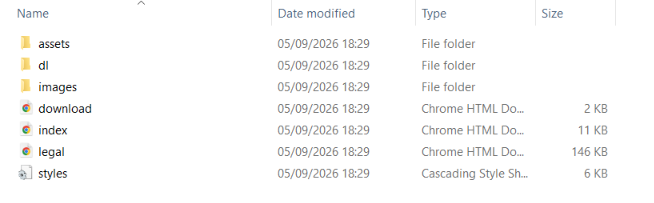
Once uploaded to your folder, unzip the file. You should see something like this
And that's it
You now have your own upgrade product to sell. The ‘AI Implementation Companion’ guide is already included in the dl folder and linked to from the download page you will direct your customers to.
The sales page will be at https://yourdomain.com/folder-name – this is the page you should send the buyers of the main guide to, straight after they buy – and the download page for your customers will be https://yourdomain.com/folder-name/download.html – just replace youdomain with your actual domain and folder-name with your actual folder name.
Hope this helps make life easier – and as always, if you have any problems or have any questions, please do let me know.