'Easy AI Prompt Pack - Marketing Kickstarter' Bonus Download Page
Thanks for getting a copy of ‘Easy AI Prompt Pack – Marketing Kickstarter Edition‘ through either my or Barry’s affiliate link.
So just to recap, you bought PLR to an AI prompts product that you can sell as your own product. We have taken the sales and download pages for that and added them to our custom made software to make rebranding with your links etc really easy.
We have also created a brand new list building funnel – one that leads nicely into your main product – complete with free giveaway (rebrandable with your link), squeeze and download page, and a follow up email sequence promoting your new product.
This is also all set up in our rebranding software.
So, just follow the steps below and you will have your own list building funnel set up in just a matter of minutes.
STEP #1: List The Products On Your Payment Processor
You will create your pages and upload them in a minute, but first you’ll need to list the product that you will be selling on whichever payment processor you will be using, for example WarriorPlus, Thrivecart, etc, (or alternatively, create a Paypal buy link).
Note: Depending on which payment processor you are using, for this listing you may need to know the URLs of your sales and download pages.
- The sales page URL for the main offer will be https://YOURURL.COM/marketingkickstarter.html
- The download page URL for the main offer will be https://YOURURL.COM/mkdownload.html
Replace YOURURL.COM with your own url – and remember to include the subfolder if you are going to be putting the pages into a folder. For example if I put all these pages inside a folder on ticketymarketing.com called kickstart, so then I would replace YOURURL.COM with ticketymarketing.com/kickstart
STEP #2: Create Your Sales Funnel
This is where you customise the squeeze page, sales page, etc that you now have – without having to know anything about html code 🙂
You will need to already have a domain and hosting.
If you still need any of these, I recommend Namecheap (for domains) and Hostgator (for cheap but reliable hosting) .
To rebrand your free report (you’ll need the Download link for Question 3 below) click here
STEP #3: Upload to your host
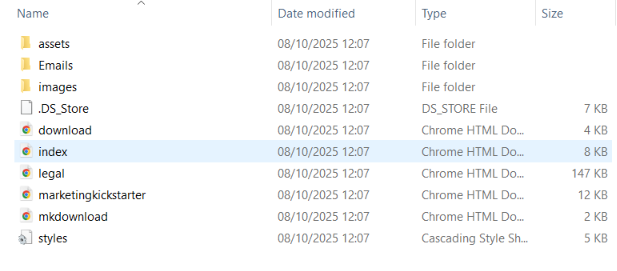
Download the completed zip file from above, and upload it to the correct folder in your web host. Once uploaded, unzip the file. You will then see something like this.
STEP #4: Add the emails to your autoresponder
In the zip file your downloaded after running the software above there is a folder called Emails – your email sequence is in this folder.
Simply copy and paste the emails from this into your autoresponder, with the first one set to go out right away, and the rest spaced out 1 day apart.
These will already include your links, name, etc.
And that's it!
You now have your own squeeze page and giveaway report to build your list, and a product to sell to your new subscribers.
As a reminder, these are the URLs of your pages:
- The squeeze page URL is at https://YOURURL.COM/
- The thank you page URL for the free report is at https://YOURURL.COM/download.html
- The sales page URL for the main offer is at https://YOURURL.COM/marketingkickstart.html
- The download page URL for the main offer is at https://YOURURL.COM/mkdownload.html
Remember, replace YOURURL.COM with your own url – and remember to include the subfolder if you have put the pages into a folder.
If you have any questions, contact me at the support link below and I’ll get back to you as soon as possible.