Buyer Bonuses
Your "Beyond Prompts" Bonuses
Thanks for getting a copy of Sarah’s PLR ‘Beyond Prompts: The New Way to Use ChatGPT’ through my affiliate link.
I have sourced and bought the rights to a great ChatGPT training product that you can sell as your own, which is the perfect product for anyone interested in these free videos.
Originally on this page I just had the download links for the product and then it was up to you to add your own details and set it up yourself, but because of the way the files were organised it was proving a bit tricky. So I have now set everything up in a rebrander for you which should make it a lot easier.
I am also including the original download link here as well in case you want it for any reason and because there are extra promotional materials included that you might find useful.
If you want this, you can download it here (Right click and save As).
To set everything up, just follow the steps below.
Step 1: Rebrand the product pages
Note: For the checkout link, you need to decide where you are selling your product (for example through Paypal, or through a payment processer such as Thrivecart) and then get the link from there. If you’re not sure how to do this, Google it – or email me at the link below if you need help.
Just fill in the details below and click ‘GENERATE’, your rebranded files should download automatically.
GPT Factory Rebrander
Step 2: Upload the files
Upload the zip file you downloaded from Step 1 to your website – if you have other content on the site, I recommend you put it into it’s own folder, say called gptfactory.
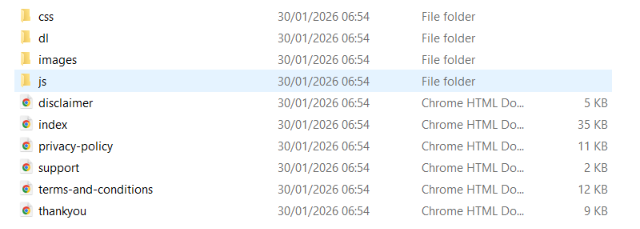
Once uploaded to your folder, unzip the file. You should see something like this
Step 3: Download the product files
The product includes videos and PDFs so this is a large file – download it below.
Step 4: Upload the product files
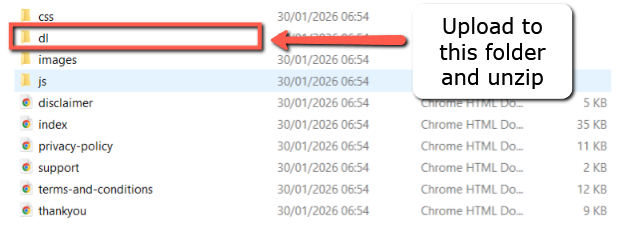
Now you need to upload this file to your site, and specifically to upload it to the folder called dl as shown in the image below.
Once uploaded, you need to unzip the file.
If you upload this to the wrong place, or do not unzip the file after uploading, the download links for your customers will not work.
And that's it
You now have your own product to sell. The sales page will be at https://yourdomain.com/folder-name, and the download page for your customers will be https://yourdomain.com/folder-name/thankyou.html – just replace youdoman with your actual domain and folder-name with your actual folder name.
Hope this helps make life easier – and as always, if you have any problems or have any questions, please do let me know.