'Affiliate Giveaway Builder'
White Label Download
Thanks for getting a white label copy of the Affiliate Giveaway Builder custom GPT.
This means that you can now sell this as your own GPT – and as I’m sure you know, there is a huge demand just now for these sort of AI tools.
Important note.
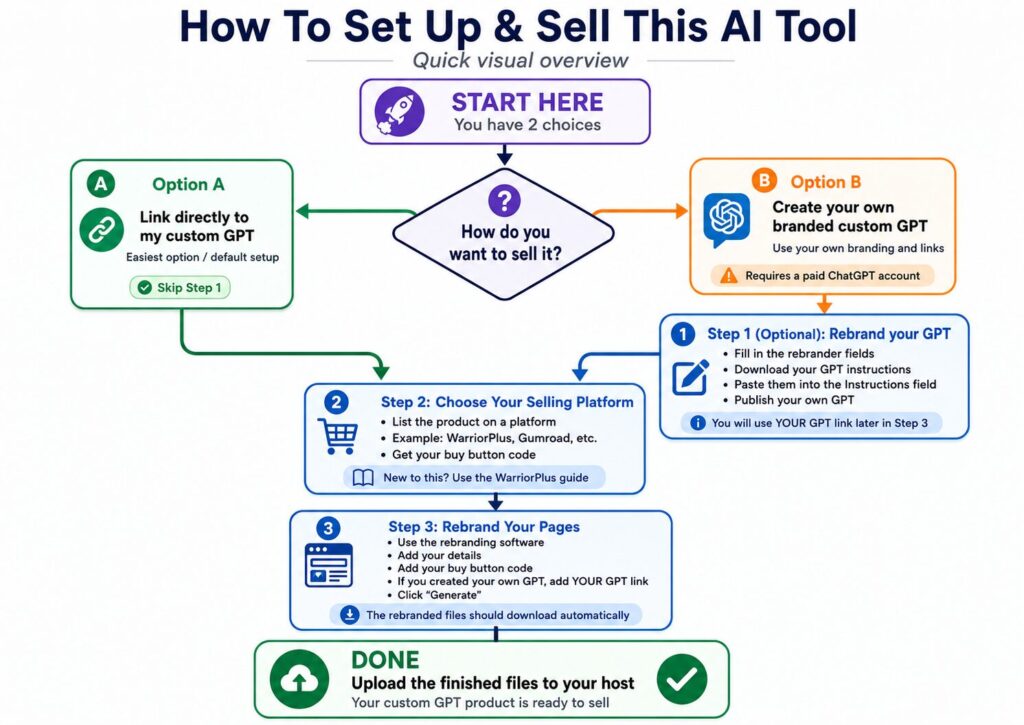
When selling this AI tool, you have 2 choices. You can either just give your customers a link directly to the custom GPT that I created – this is the easiest way and the default way I have set this up in the DFY pages used in the rebranding software below.
If you are happy with this, you don’t need to do anything more – just simply go straight to Step 2 below and rebrand the sales and delivery pages below, upload those and you are good to go.
But alternatively, you can set this up as your own custom GPT and rebrand it with your own details. The advantage is that you can add your branding and your links, but the disadvantage is that you need to have a paid ChatGPT account to create your own GPTs.
If you do want to do this, complete the fields in Step 1 below.
If not, just ignore Step 1 and go straight to Step 2.
Step 1. Rebrand your GPT (optional)
As I explained above, this step is optional, you can just link directly to my version of the GPT (you can see it here), and you do need to have a paid Chat GPT account to be able to publish your own GPTs.
But if you want to do this, I have the instructions set up in a rebrander. Just fill in the fields below to rebrand it with your own details.
The file you download at the end will include the exact instructions you need to paste into the instructions field when creating your own custom GPT, with your rebranded details included.
If this is the first time you have created a custom GPT, you can get detailed instructions here – and YouTube is also a good place to get help too.
GPT Rebrander
Step 2. Choose Your Selling Platform
You can sell this wherever you want, but generally you’ll need a platform to list it on (for example WarriorPlus, Gumroad, etc), so your first job is to get the product listed.
If you are new to all this, I have a very good guide that shows exactly how to list and sell products on WarriorPlus – you can download a free copy here (direct access).
Whatever way you choose to sell this, you will need your buy button code for the next step.
Step 3. Rebrand your pages.
I have set up your sales and delivery pages (and legal pages) and added them to one of my custom made softwares that makes rebranding it all with your details very easy.
You can rebrand it all below, then just download the finished file and upload it to your host, and you will have this Custom GPT to sell as your own.
Remember, if you have chosen to rebrand the GPT itself and set it up in your own ChatGPT account, you need to do this first, and then make sure you add the link to YOUR published GPT in the ‘Link to the custom GPT’ below.
When you click ‘Generate’ the rebranded files should automatically download.
Affiliate Giveaway Builder Rebrander
Step 4. Upload the pages to your site.
Now just upload the zip file you downloaded to your chosen folder on your site, unzip it and you’re good to go.
Once uploaded, your links will be:
Your Sales Page
https://yourdomain.com/folder/
Your Customers’ Download Page
https://yourdomain.com/folder/thanks.html
Just change yourdomain.com to your actual domain, and folder to the name of the folder you add these files to.
And that’s it.
I have tried to make this as straightforward as possible, but if you need any help, please don’t hesitate to get in touch (there’s a Support link at the bottom of the page).